
D4W Marketing allows users to manually export new patients data to upload the list in the D4W Marketing Portal to send New Patient Welcome Pack Communication.
For patients to be included in this list, the appointment must be set with the N status
Run the Report
-
Go to Appointment Book > Reports menu
-
Export eMarketing List
-
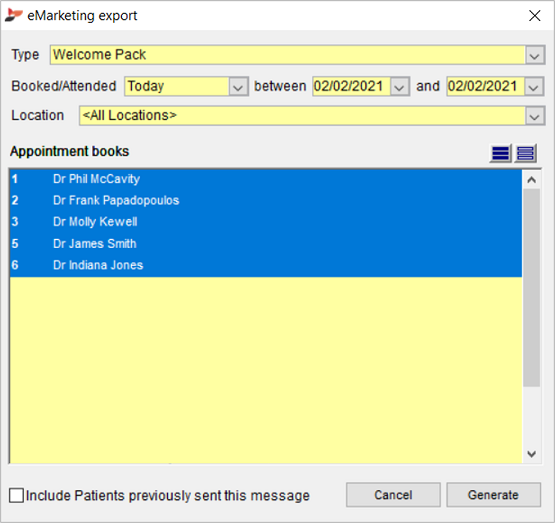
Type: Select Welcome Pack
-
Booked/Attended: Select the period to base this list on
-
Location: Select the location or <Any Location> from the drop list if applicable
-
Appointment books: Select the appointment book/s to include in the list
-
Include Patients previously sent this message: Tick to include patients who have previously been sent a Welcome Pack (not recommended)
-
Click Generate
-
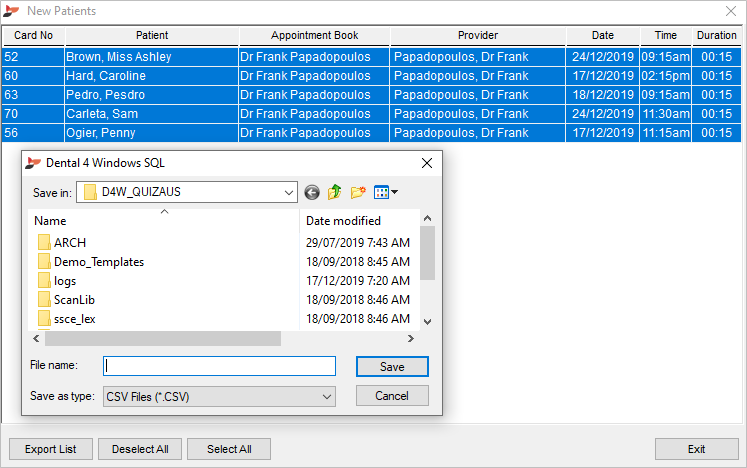
New Patient List
A list of all new patients with appointments created in a specific period with the status N will show in this list.
-
Highlight patient/s
-
Click Export List
-
Save the list in to later import in the D4W Marketing Portal
Comments
Please sign in to leave a comment.